Free UAT testing templates: Excel, Word & PDF

What’s in this article
- Why use UAT templates?
- What should a UAT test plan template include?
- How do you write a UAT test case template in Excel?
- Which format works best for each UAT template?
- What is a UAT sign-off template and why does it matter?
- What does a UAT checklist template look like?
- How do you adapt UAT templates for different project types?
- What are the most common UAT template mistakes?
- When aren’t UAT templates enough on their own?
- FAQ
A user acceptance testing template is a pre-built document structure that guides your team through the UAT process — from defining test cases to logging results and getting final sign-off. Good templates save setup time, keep everyone aligned on what needs to be tested, and create a paper trail that matters when clients, stakeholders, or auditors ask questions later.
This guide covers the four essential UAT templates every team needs, explains what each one should contain, and shows you how to use them effectively — including a leaner alternative when templates aren’t enough.
Key takeaways:
- The four essential UAT templates are: test plan, test cases, sign-off, and checklist.
- Excel works best for test cases and tracking. Word and PDF suit test plans and sign-off documents.
- Every template should trace back to business requirements — untraceable testing is untestable testing.
- Templates handle structure; a visual feedback tool like Ybug handles live defect capture during testing.
Why use UAT templates?
UAT involves multiple people — developers, project managers, QA engineers, business stakeholders, and often clients — all working from different expectations. Without a shared structure, the process becomes chaotic: testers don’t know what to test, results aren’t documented consistently, and sign-off happens verbally with nothing in writing.
Templates solve three problems:
Consistency. Every tester follows the same format, which makes it easier to review results, identify patterns, and compare findings across testing cycles.
Traceability. Every test case links back to a specific business requirement. If a client disputes whether a feature was tested, the documentation proves it.
Speed. Starting from a blank document every project wastes time. A solid template means your team spends time testing, not formatting.
What should a UAT test plan template include?
The UAT test plan is the strategic document that governs the entire testing phase. It’s created before testing begins — ideally at the start of the project — and defines the rules everyone plays by.
What a UAT test plan should include:
| Section | What to write |
| Project overview | Name, description, version, testing dates |
| Scope | What will be tested and what is explicitly out of scope |
| Test objectives | What success looks like — specific, measurable outcomes |
| Entry criteria | Conditions that must be met before UAT can begin (e.g., QA sign-off, staging environment ready) |
| Exit criteria | Conditions that define UAT completion (e.g., all critical defects resolved, stakeholder sign-off obtained) |
| Testers and roles | Who is testing, what they’re responsible for, and their access level |
| Test environment | URL, browser requirements, test accounts, data setup instructions |
| Defect management | How bugs will be logged, prioritized, and tracked (tool, severity scale, response SLA) |
| Schedule | Testing phases, deadlines, review checkpoints |
| Risks and mitigations | Known risks (e.g., limited tester availability) and how you’ll address them |
The entry/exit criteria model aligns with the IEEE 829 standard for software test documentation, which remains the most widely referenced framework for structuring test plans — even in agile environments.
Tip for PMs: Agree on exit criteria with the client before the project starts — not during UAT. Revisiting “what does done mean?” during testing is the fastest way to delay a go-live. This applies equally to project managers coordinating client delivery and to in-house product teams managing stakeholder sign-off.
How do you write a UAT test case template in Excel?
Test cases are the heart of UAT. Each one describes a specific scenario a tester will execute, step by step. A good test case is detailed enough that someone unfamiliar with the product can follow it without guidance.
UAT test case template (Excel/spreadsheet format):
| Field | Description | Example |
| Test case ID | Unique identifier | TC-001 |
| Test case name | Short, descriptive label | User login with valid credentials |
| Linked requirement | Business requirement or user story this case covers | REQ-012: Users must be able to log in with email and password |
| Pre-conditions | What must be true before the test begins | User has a registered account. Browser: Chrome latest. |
| Test steps | Numbered actions the tester performs | 1. Go to app.example.com/login 2. Enter valid email and password 3. Click “Sign in” |
| Expected result | What should happen | User is redirected to the dashboard. |
| Actual result | What actually happened (filled in during testing) | The link did not work, and the page did not load. |
| Status | Pass / Fail / Blocked | Fail |
| Defect ID | If failed, link to the logged defect | DEF-2026-045 |
| Tester | Name of the person who executed the case | John Müller |
| Notes | Anything else relevant | Tested on macOS 14, Chrome 121 |
One test case = one scenario. Don’t bundle multiple workflows into a single case — it makes results ambiguous and defects harder to trace.
Which format works best for each UAT template?
Not every template belongs in the same file format. Test cases need filterable rows — that’s a spreadsheet job. A test plan with narrative sections and risk tables reads better as a document. And a sign-off template needs a fixed layout for signatures, which means PDF for the final version.
| Template | Best format | Why |
| Test plan | Word / PDF | Long-form narrative document with sections, descriptions, and risk tables. Easy to share for review and final approval. |
| Test cases | Excel / Google Sheets | Structured rows and columns. Testers fill in actual results, status, and defect IDs during testing. Filterable, sortable. |
| Sign-off | Word → PDF | Created in Word for editing, exported to PDF for the final signed version. Signatures and dates need a fixed layout. |
| Checklist | Excel or Word | Simple checkbox format. Excel if you want conditional formatting (e.g., highlight incomplete items). Word if it’s a one-page printout. |
Tip: Don’t lock yourself into one format. Most teams use Excel for test cases (where data changes daily) and Word or PDF for test plans and sign-offs (where the document is reviewed and finalized once).
What is a UAT sign-off template and why does it matter?
The UAT sign-off is the formal document that closes the testing phase. It’s the written record that all required testing was completed, results were reviewed, and the software was accepted for deployment.
UAT sign-off template — key elements:
- Project and version details — what was tested and when
- Summary of testing scope — what was covered and what was out of scope
- Test results summary — total test cases, pass/fail/blocked counts
- Outstanding defects — a list of any known issues accepted as-is, with justification
- Approvals — names, roles, signatures, and dates for each stakeholder signing off
- Deployment authorization — explicit confirmation that the software is cleared for production release
Even for smaller projects, get sign-off in writing — an email confirmation with all parties copied is acceptable when a formal signature isn’t practical. Verbal sign-off has no paper trail.
UAT sign-off isn’t just a formality — it’s the moment everyone agrees on the same reality. Without it, “I thought it was accepted” and “I thought you’d fix that” become the most expensive phrases in any project.
What does a UAT checklist template look like?
A checklist is the lightweight companion to your test plan — a quick reference your team can run through at key stages. Use it to confirm readiness before testing starts and completeness before sign-off.
Pre-UAT readiness checklist:
- UAT test plan reviewed and approved by all stakeholders
- Staging / test environment is set up and accessible
- Test data is prepared (real or anonymized production-like data)
- All testers have been briefed on the process and tools
- Test accounts and access credentials are ready
- Defect logging tool is configured (Jira, Trello, Asana, or similar)
- Entry criteria confirmed — QA has signed off on the build
UAT close-out checklist:
- All test cases have been executed
- All critical and major defects have been resolved and retested
- Outstanding minor/trivial defects have been reviewed and accepted or deferred
- UAT sign-off document has been completed and signed
- Deployment plan is confirmed
How do you adapt UAT templates for different project types?
A UAT template designed for one context rarely transfers cleanly to another. The fields are the same, but the emphasis, the number of test cases, and the sign-off process differ significantly depending on what you’re building and who you’re building it for.
E-commerce projects
UAT for an e-commerce site is heavily focused on transactional flows: product pages, cart, checkout, payment, order confirmation, and email notifications. Test cases should cover the full purchase journey from multiple entry points — direct URL, search, category browse — and across multiple user states: guest, logged-in, returning customer with saved address. Edge cases around coupon codes, out-of-stock items, and payment failures need their own test cases. The sign-off typically requires both the client and a business stakeholder (often the marketing or operations lead) to approve.
SaaS and web app projects
SaaS UAT is usually longer and more complex than website UAT because the number of user roles and workflows is higher. A SaaS app might need separate test case sets for admin users, standard users, and guest users — each with different permissions and views. Key areas: account creation and login flows, core feature workflows, integrations with third-party tools, billing and subscription management, and notification/email triggers. The sign-off process often happens in phases — one round per major feature area — rather than a single final review.
Client website delivery (agency context)
For agencies handing off a completed website to a client, UAT doubles as both a quality check and a client education moment. The test cases should be written in plain language the client can follow without technical knowledge. Include visual checks (logo, fonts, colors, spacing) alongside functional ones (forms, navigation, CMS editing). The sign-off document should explicitly reference the original project brief or statement of work — this protects both the agency and the client if disputes arise about what was agreed. Freelancers working solo with a single client can simplify the process but should still get written sign-off before go-live.
Internal tools and process software
When the end users are employees rather than customers, UAT can involve more structured scenarios tied to specific business processes. Access control, audit logging, and data integrity are common test areas that don’t come up in consumer-facing projects. The exit criteria often need approval from IT, compliance, or legal — not just the project sponsor.
What are the most common UAT template mistakes?
Overly complex test cases. If a test case takes 20 steps and three pre-conditions, it’ll be skipped or executed incorrectly under time pressure. Keep individual cases focused and manageable.
No link to requirements. Test cases that aren’t traced back to specific requirements create a blind spot. If a requirement isn’t covered, you won’t know until a client points it out post-launch.
Using the same template for every project type. A UAT template for an e-commerce platform needs different scenarios than one for an internal HR tool. Templates are starting points — adapt them to the project.
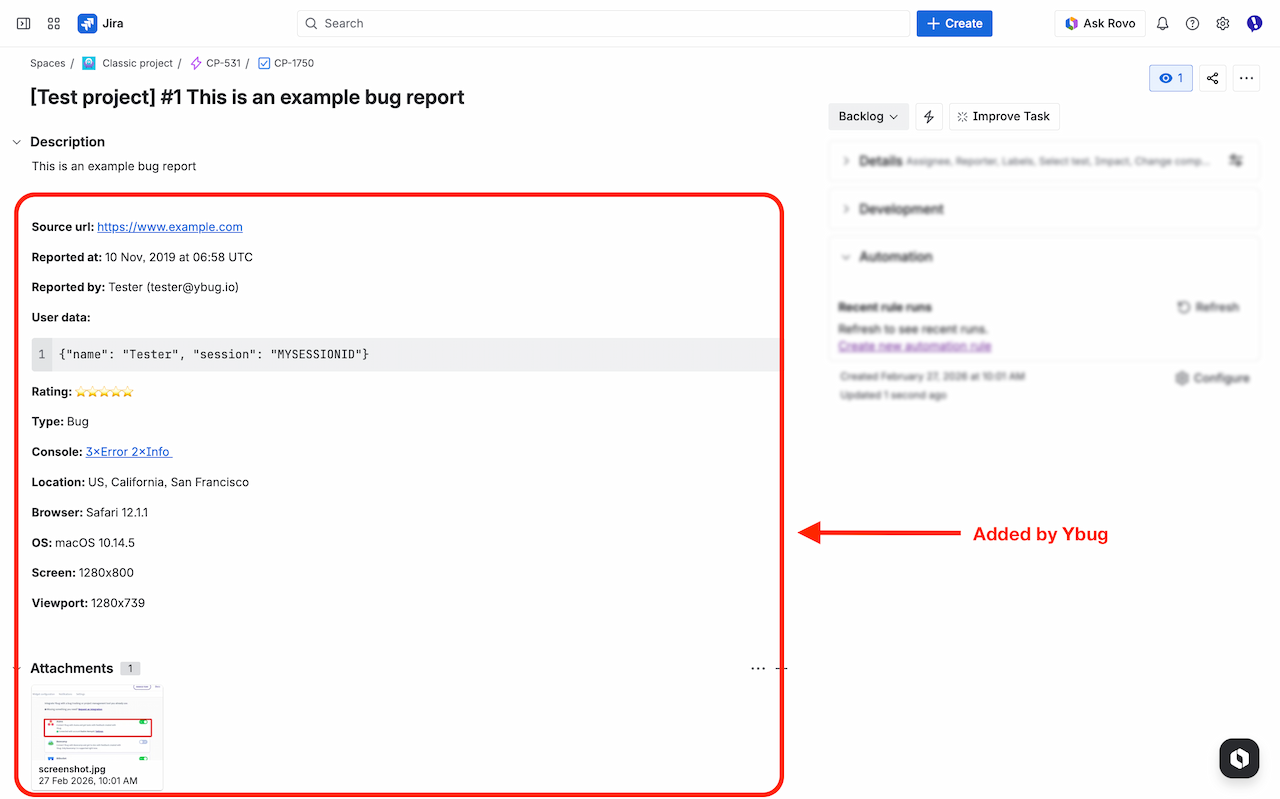
Treating the Excel template as the feedback tool. Spreadsheet templates are useful for planning and documentation, but they’re poor environments for capturing and managing actual defects during testing. Testers should log issues in a dedicated bug reporting tool that captures technical context automatically.
When aren’t UAT templates enough on their own?
Templates structure the process. But during active testing, the bottleneck isn’t paperwork — it’s how quickly testers can report issues and how clearly those reports communicate the problem.
A tester filling out a UAT spreadsheet after the fact misses details: the exact browser version, the JavaScript error in the console, the specific page state when the bug appeared. By the time they write it up, they’ve moved on to the next test case.
A website feedback tool installed on the test environment solves this. When something doesn’t match the expected result in a test case, the tester clicks the button, annotates the screenshot, and submits. The report lands in Jira (or Trello, or Asana) with full technical context captured automatically — browser, OS, screen resolution, page URL, console logs.
Ybug works as a dedicated user acceptance testing feedback layer on top of your UAT process. It doesn’t replace your test case templates — it fills the gap between “test case failed” and “developer-ready defect report.” You can check pricing to find the plan that fits your team size.
