Organize Faster: Team-Level Tags and API Enhancements

What’s in this article
We’ve been busy building new ways to streamline your feedback loop. Today, we’re announcing a major architectural shift: we’ve migrated tags from the project level to the team-account level, meaning they are now shared and consistent across every project in your team. Alongside this migration, we’ve added a draggable widget toolbar for better visibility during annotations and significantly expanded our REST API with full CRUD support for tags and comments, as well as managing feedback assignees.
TL;DR: What’s new?
- Team-level tags: Tags are now shared across all projects in your team for better consistency and account-wide filtering.
- Tag management: A new dedicated page to rename, merge, and tidy up your team’s tags in bulk.
- Draggable toolbar: You can now move the widget tools anywhere on the screen during feedback capture.
- API updates: New CRUD endpoints for managing tags, comments, and member assignments.
What are tags anyway?
In many project management tools, you might know them as labels. Essentially, tags are short, descriptive keywords you can attach to a feedback report. They’re a simple yet powerful way to group and filter your tasks without being stuck in a rigid structure.
Tags: An extra layer for your workflow
It’s worth noting that Ybug already has built-in fields for the essentials—like status, priority, and feedback type (bug, suggestion, or general comment). You don’t need tags for those.
Think of tags as a flexible layer on top of those standard fields. While status tells you where a report is in your pipeline, tags can tell you which specific feature it affects, which customer segment it came from, or which sprint it belongs to. They’re there for the details that are unique to how your team works.
What’s changed with tags
Tags have been a staple of Ybug for a long time, but previously, they were unique to each project. This worked fine for small teams, but it became a headache as you scaled. You couldn’t easily filter by a specific tag across your whole account, and you often ended up with duplicate tags like “UI” in Project A and “ui” in Project B.
We’ve migrated all tags to the team level. Here’s what that means for you:
- Cross-project consistency: A tag created in one project is now automatically available in all your other projects.
- Better filtering: You can now filter and view reports by the same tag across your entire account.
- Deduplication: We’ve automatically merged tags with the same name during the migration.
- Tag management: We’ve added a dedicated Tag management page to your settings where you can merge, rename, or delete tags in bulk.
New: Draggable widget toolbar
We know that when you’re annotating a screenshot or recording a video, the toolbar can sometimes get in the way of a crucial detail on the page.
To make things a bit easier, we’ve made the Widget toolbar draggable. You can now simply grab the toolbar and move it anywhere on the screen. It stays out of your way while you focus on capturing the perfect feedback report.
Powerful updates to the REST API
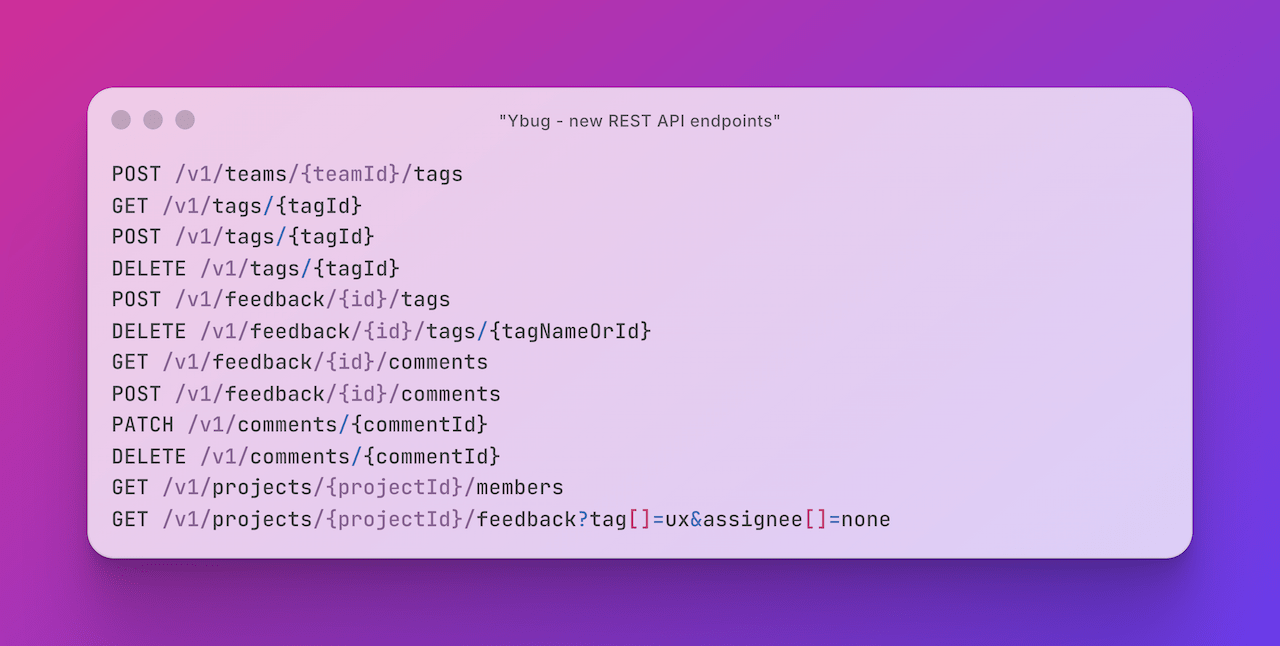
For those of you building custom integrations or automating your workflows, we’ve significantly expanded our REST API. You can find the full technical details in our updated API Documentation.
We’ve added full CRUD support for the core elements of your feedback:
- Feedback Tags: Programmatically create, update, or delete the team-level tags mentioned above and attach them to feedback items.
- Comments & Public Replies: List, create, and delete comments via the API. To send a public reply to the reporter, just set
internal=false. - Assignments: You can now programmatically set, unset, and filter by assignees using the new assignment endpoints and the
assignee_idfield.
We’re excited to see how these changes help you and your team move faster. If you have any thoughts or questions about these updates, feel free to reach out!
