Bug report templates: free downloads for every platform

What’s in this article
A bug report template gives your team a consistent structure for logging software issues — so every defect includes the information a developer actually needs to reproduce and fix it. No more “button broken” tickets. No more three-round back-and-forth asking for the browser version.
A bug report template is a pre-defined structure that ensures every defect ticket contains the information a developer needs to reproduce and fix it — without follow-up questions.
What makes a good bug report template?
Every bug report format needs to answer the same core questions: What happened? Where? Under what conditions? How do we reproduce it? What should have happened instead?
The fields that matter in any template:
| Field | Why it’s essential |
|---|---|
| Title | Specific and descriptive — What + Where + Trigger. Developers scan titles to prioritize. |
| Environment | OS, browser + version, device, app/build version. Many bugs are environment-specific. |
| Steps to reproduce | Numbered, exact steps anyone can follow. The most critical section. |
| Expected result | What should happen according to the spec or design. |
| Actual result | What actually happened. Include exact error messages verbatim. |
| Severity / priority | Severity = user impact. Priority = urgency. They’re not always the same. |
| Screenshots / video | Visual evidence eliminates most follow-up questions. |
| Console logs | Browser console errors and network failures. Gold for developers. |
A template is only as useful as the team’s commitment to filling it in. The most common failure: teams have a template but write vague descriptions in the “actual result” field anyway. Pair your template with clear examples of what “good” looks like.
General bug report template (copy & use) 📋
This template works in any issue tracker — Jira, Trello, Asana, Linear, or plain text. Customize the field names to match your team’s conventions:
Title: [What happened + Where + What triggered it]
Reporter: [Name]
Date: [YYYY-MM-DD]
ENVIRONMENT
- OS: [e.g., macOS 14.3]
- Browser: [e.g., Chrome 121.0.6167.85]
- Device: [e.g., MacBook Pro 14”]
- App / build version: [e.g., v2.4.1 – production]
- URL: [Exact page URL where the bug occurred]
STEPS TO REPRODUCE
- [First step — include user role, starting URL, exact input data]
- [Second step]
- [Continue until the bug appears]
EXPECTED RESULT
[What should have happened]
ACTUAL RESULT
[What actually happened — copy error messages verbatim]
Severity: [Critical / Major / Minor / Trivial]
Priority: [High / Medium / Low]
ATTACHMENTS
[Screenshot, screen recording, console log]
ADDITIONAL NOTES
[Frequency — every time or intermittent? Workaround? Related tickets? Theories?]
Jira bug report template
Jira is the most widely used bug tracking tool in software teams. Its default Bug issue type maps well to a standard bug report format, but it’s worth adding custom fields for environment and reproduction steps if your team hasn’t already.
Recommended Jira field setup:
| Jira field | What to put here |
|---|---|
| Summary | Specific title: What + Where + Trigger |
| Issue type | Bug |
| Priority | Blocker / Critical / Major / Minor / Trivial |
| Description | Steps to reproduce, expected result, actual result |
| Environment (custom field) | OS, browser, device, build version |
| Affects version | The release or build number where the bug was found |
| Labels | frontend, backend, regression, UAT, etc. |
| Attachments | Screenshot, video, console log |
Pro tip: Add a description template in Jira’s issue type settings so every new bug pre-fills the structure automatically. This dramatically improves report quality without requiring testers to remember the format each time.
Filled-in Jira bug report example:
Summary: “Add to Cart” button unresponsive on product page — Chrome 121, macOS Priority: Major Environment: macOS 14.3, Chrome 121.0.6167.85, v2.5.0 staging Steps to reproduce: 1. Navigate to /products/blue-widget 2. Click “Add to Cart” 3. Observe Expected: Item added to cart, cart count increments in header Actual: No response — no loading state, no network request in DevTools, no console errors
Website bug report template
A website bug is a flaw or unexpected behavior in a web application that prevents it from functioning as intended. These issues are often environment-dependent (browser, screen size, device type) and are frequently reported by non-technical users — clients, end users, or stakeholders — who don’t know what “console logs” means.
Therefore, a website bug report template should be simple enough for anyone to fill out:
- Page URL: [Full URL where the bug appears]
- Date / time: [When you noticed it]
- What happened: [Describe what went wrong in plain language]
- What you were doing when it happened: [Describe your actions step by step]
- What you expected to happen: [What should have happened]
- Your browser and device: [e.g., Safari on iPhone 14, or Chrome on a Windows laptop]
- Screenshot: [Attach a screenshot showing the issue]
The biggest challenge with website bug reporting from non-technical users is getting accurate environment data. Most users don’t know their browser version — and they shouldn’t have to. This is exactly the gap that a bug reporting tool fills: when a user clicks the feedback button on your site and submits a report, their browser, OS, screen resolution, page URL, and JavaScript console logs are captured automatically. No input required from the reporter. For teams running QA testing cycles, this same automatic context capture works for internal testers too — every report arrives with the technical data developers need, regardless of who submitted it.
Software bug report template
For development teams, a software bug report template needs more technical depth — especially for environment details and console output:
Title: [Component/feature] — [what broke] — [environment trigger]
Build / version: [e.g., v3.1.2-rc1]
Reporter: [Name + role]
Date: [YYYY-MM-DD]
ENVIRONMENT
- OS + version: [e.g., Windows 11 22H2]
- Browser + version: [e.g., Firefox 122.0]
- Device / hardware: [e.g., Dell XPS 15]
- Screen resolution: [e.g., 1920×1080]
- User role / account type: [e.g., Admin, registered user, guest]
STEPS TO REPRODUCE
- [Starting state — which user, which URL, what data]
- [Action]
- [Action]
[Result appears at this step]
EXPECTED RESULT
[Behaviour per spec or design]
ACTUAL RESULT
[What happened — include exact error text, HTTP status codes, console output]
SEVERITY: [Critical / Major / Minor / Trivial]
PRIORITY: [High / Medium / Low]
ATTACHMENTS
- Screenshot: [filename or link]
- Screen recording: [link]
- Console log: [paste or attach]
- Network log (.har): [attach if relevant]
ADDITIONAL NOTES
- Reproducibility: [100% / intermittent — describe frequency]
- Workaround: [if any]
- Suspected cause: [optional — mark clearly as a theory]
- Related tickets: [link]
The key difference between a software template and a website template is the user role field and the network log attachment. Many software bugs are role-specific — an admin sees behavior that a standard user never encounters — and the .har network log often contains the server-side response that tells a developer exactly what went wrong before they open DevTools themselves.
Bug report template for Word & Excel
Sometimes teams need a bug report template that lives outside a project management tool — for client handoffs, compliance documentation, or teams who aren’t using dedicated issue trackers yet.
For Word (.docx): Use a table with the fields from the general template above. Add a header with project name, version, and date. Works well as a formal defect log for client delivery.
For Excel (.xlsx): Use one row per bug, with columns for each field (ID, title, environment, steps, severity, status, assignee, date found, date resolved). Add a dropdown for severity and status columns. This format is easy to filter and sort — useful for tracking progress across a large batch of reported issues.
When to use spreadsheet templates vs. a dedicated tool: Spreadsheet templates work fine for small projects or one-off audits. For ongoing bug reporting across active development, a dedicated tool with direct integration into your project management workflow is faster and produces higher-quality reports.
GitHub bug report template
GitHub’s built-in issue templates let you pre-define the bug report structure so contributors always follow the same format. To set one up, create a file at .github/ISSUE_TEMPLATE/bug_report.md in your repository:
       ---
       name: Bug report
       about: Report a bug to help us improve
       labels: bug
       ---

       **Describe the bug**
       [A clear description of what the bug is]

       **Steps to reproduce**
       1. Go to '...'
       2. Click on '...'
       3. Observe error

       **Expected behaviour**
       [What you expected to happen]

       **Actual behaviour**
       [What actually happened]

       **Environment**
       - OS: [e.g., macOS 14]
       - Browser: [e.g., Chrome 121]
       - Version: [e.g., v2.4.1]

       **Screenshots / logs**
       [Attach screenshots, console output, or error logs]

       **Additional context**
       [Any other relevant context]
Once this file is in place, GitHub automatically presents it as a template when someone opens a new issue — no manual formatting required.
How to skip the template entirely 🚀
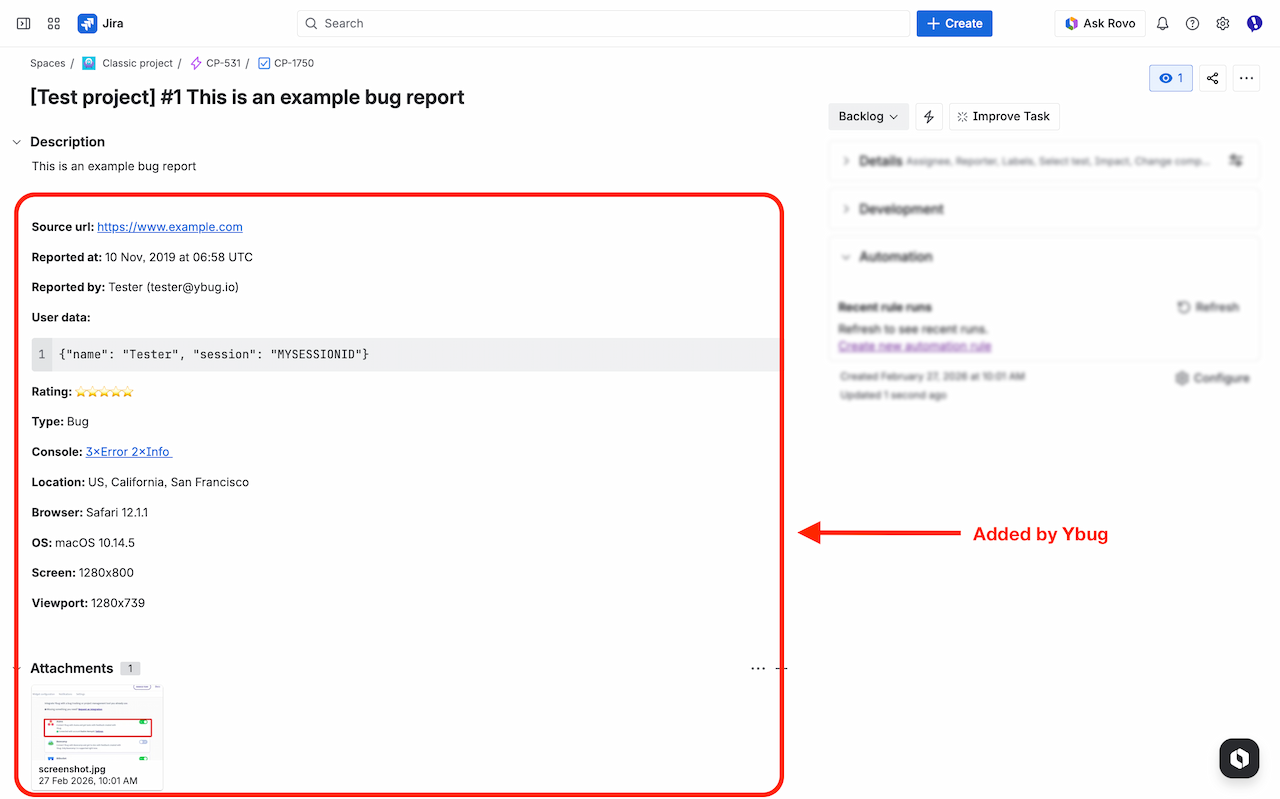
Templates improve consistency. But they don’t solve the underlying problem: manually filling in environment details is slow, error-prone, and gets skipped under deadline pressure.
The better approach — especially for website and web app bug reporting — is a visual feedback widget that captures the technical context automatically. When a tester, client, or end user spots an issue, they click a button, annotate a screenshot, describe the problem, and submit. The resulting report includes browser, OS, screen resolution, page URL, and console logs without anyone having to look them up.
Ybug works exactly this way. Reports go directly to Jira, Trello, Asana, GitHub, or your preferred project management tool via integrations — formatted as a ready-to-triage ticket, not a raw form submission. It’s the fastest path from “I found a bug” to “developer can fix it.”
A bug report template sets the standard. But the real bottleneck isn’t the format — it’s the moment of reporting. If it takes more than 30 seconds to capture and submit an issue, people start cutting corners on the details that matter most.
You can start free to see how much faster bug reporting becomes when context is captured automatically.
